7 Mistakes When Choosing SERP Empire Alternatives and CTR Tools
You pick a CTR tool, pay for credits, and have no screenshot to prove a single visit happened. Many platforms also skip Bing, Maps and AI Overviews, so your traffic never matches where customers search. That gap between promise and evidence is where budgets quietly disappear.
This article walks through seven mistakes buyers make when comparing SERP Empire alternatives and CTR tools, from missing visit proof to unclear credit rules and pricing. By the end, you will know how to check platform coverage, targeting controls and setup requirements, and whether CTRTool fits your campaigns.
What Is CTRTool? The CTR Tool Built Around Screenshot Proof
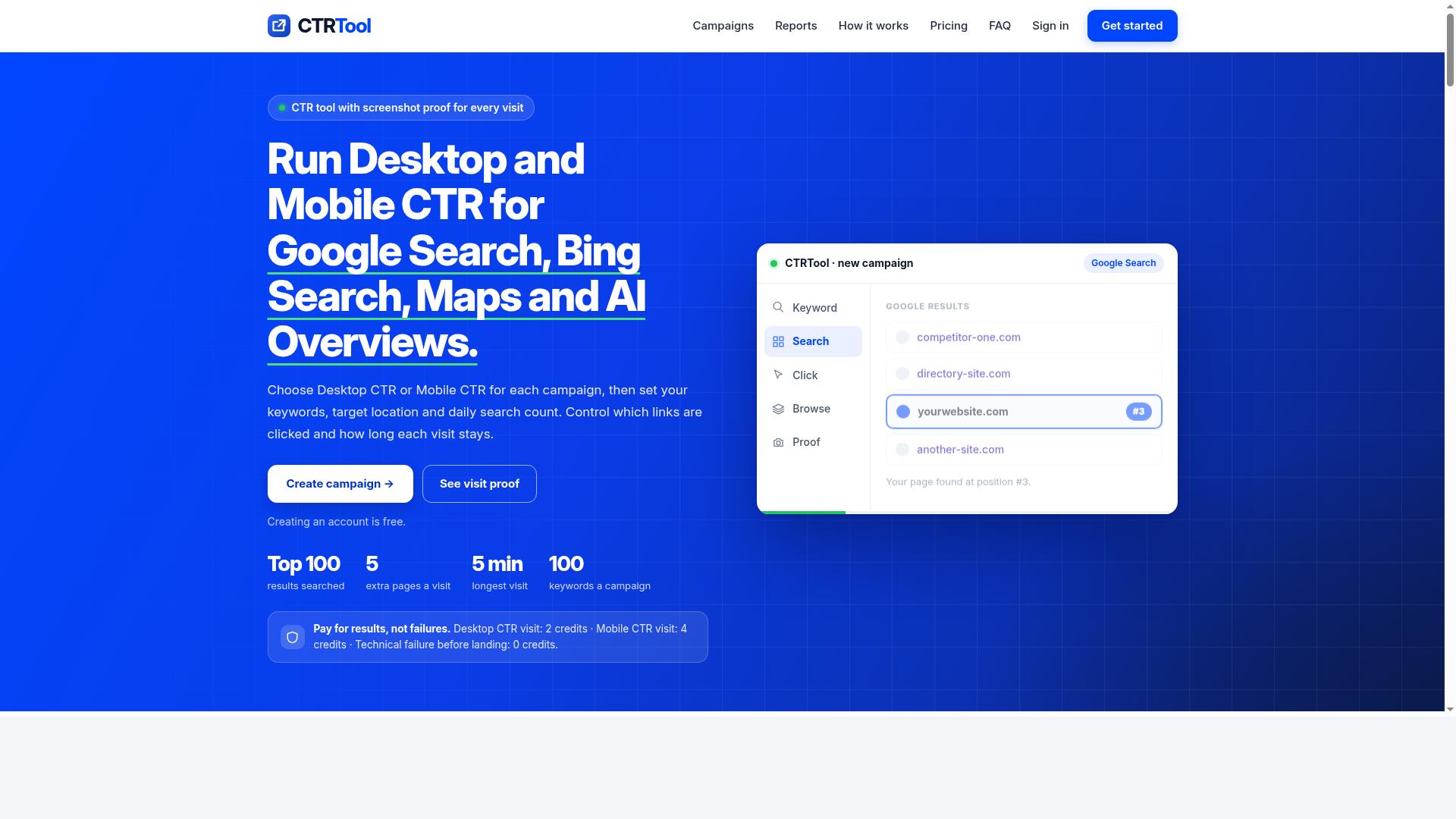
CTRTool is a SaaS platform that runs click-through rate (CTR) campaigns for Google Search, Bing Search, Google Maps, and AI Overviews, with the defining feature of providing screenshot proof for every visit. It is a focused CTR campaign tool, not a broad SEO suite.
That distinction matters when comparing SERP Empire alternatives. Many SEO platforms bundle SERP tracking, keyword rank tracking, backlink analysis, and site audits into one dashboard. CTRTool does not try to be all of those things. It does one job: executing CTR campaigns and showing you evidence that each visit happened.
For buyers weighing CTR tools, this narrow scope is either a strength or a limitation depending on what you need. If your goal is a ranking tool that also manages content workflows, CTRTool is not that product. If your goal is running controlled visits with documentation, the single-purpose design keeps the workflow clear.
The core value proposition is simple to state. Every visit is documented with search and landing screenshots, so campaign activity is visible rather than assumed.
Real devices, real targets. CTRTool executes visits from real devices, either Desktop or Mobile, to the keywords or listings you choose. Users pick Desktop CTR or Mobile CTR per campaign, which keeps device behavior consistent across a campaign instead of mixing signals randomly.
Location targeting. Campaigns can target specific countries, states, and cities. That level of geographic control lets you align visits with the markets you actually care about, rather than sending traffic from wherever happens to be convenient.
Campaign control. Beyond device and location, users set keywords and a daily search count, and they control which links are clicked and how long each visit stays. These controls shape what a campaign looks like from the search engine's perspective.
Proof over promises. The screenshot record is what separates CTRTool from tools that report activity in a dashboard without visual evidence. Search and landing screenshots give you something concrete to review after a campaign runs.
One point deserves emphasis, and it comes directly from the brand: automated visits do not guarantee rankings. CTRTool states this plainly on its site. Any CTR tool that promises guaranteed positions is overselling, and readers evaluating SERP Empire alternatives should treat such claims with suspicion.
This honesty fits the article's broader theme. A common SEO mistake is choosing a ranking tool based on hype rather than on what it actually delivers and documents. CTRTool's positioning is narrow and verifiable: campaigns run, visits are logged, screenshots are captured, and outcomes are left to the search engines.
In short, CTRTool is best understood as a proof-backed CTR campaign platform for Google Search, Bing Search, Google Maps, and AI Overviews. It serves users who want documented campaign execution with device, location, keyword, and visit-duration control, and who understand that no tool can promise a ranking outcome.
Do the 7 Common Mistakes Apply to CTRTool? A Direct Answer
Yes, the seven common mistakes in CTR tool selection can be evaluated against CTRTool, and this article will show how the tool addresses each one directly.
The purpose here is structure, not salesmanship. Before judging any SERP Empire alternative, readers need a clear checklist to test a tool against. The seven mistakes below form that checklist, and each one gets its own examination in the sections that follow.
The mistakes covered in this article are:
- Choosing a tool with no proof of visits or verifiable delivery
- Ignoring platform coverage across search engines and devices
- Overlooking targeting controls for keywords, geography, and audience
- Not checking pricing transparency and subscription cost structure
- Skipping eligibility and setup requirements before committing
- Missing reporting and tracking for campaign performance
- Ignoring support and legal clarity around the vendor
Each of these ties back to everyday concerns in tool selection: data accuracy, interface usability, vendor reputation, and how a dashboard actually reflects campaign results. A CTR tool that fails any single item on this list creates risk that compounds over time.
Readers comparing SERP Empire alternatives should treat these seven points as a scorecard. The upcoming sections apply each mistake to CTRTool at a high level, so the reader can see where the tool fits and what to verify independently before subscribing.
By the end, the goal is a clear verdict rather than an open question. Each mistake will be answered on its own terms, and the full picture will show whether CTRTool holds up against the criteria that matter most in CTR campaign software.
Mistake 1: Choosing a Tool With No Proof of Visits
A common mistake is selecting a CTR tool that cannot verify that visits actually occurred, leaving users unable to confirm campaign delivery. Without that evidence, real clicks and simulated ones look identical in a dashboard.
This gap makes proper auditing impossible. You cannot validate keyword positions, confirm that a landing page was reached, or judge whether a campaign produced the organic traffic behavior you paid for.
Aggregate click counts alone tell you nothing about what happened on the search engine results page. For anyone comparing SERP Empire alternatives, verifiable proof should be a baseline requirement, not an optional extra.
How CTRTool's Search and Landing Screenshots Solve This
CTRTool provides separate search and landing screenshots for every visit, creating an auditable record that the click occurred and the page loaded. Each visit generates two distinct proof images rather than a single summary number.
The search screenshot shows the keyword and the result position at the time of the visit. The landing screenshot shows the destination page that was reached. Together they close the gap between "a click was reported" and "the visit can be confirmed."
These screenshots are stored and accessible, so users can review campaign activity after the fact instead of trusting a live counter. That supports keyword rank tracking over time, including Maps listing order and AI citation order.
- Search screenshot: keyword plus result position
- Landing screenshot: the destination page that loaded
- Stored proof: available for later review and auditing
This proof layer is a core differentiator against tools that only report aggregate clicks. It also fits the pay-for-results credit model: no credits are charged for technical failures before landing, and visits that cannot verify the requested location use no credits.
For teams running a feature comparison across SERP Empire alternatives, screenshot proof is one of the clearest signals of data accuracy. A tool that can show its work is easier to trust than one that asks for faith.
Mistake 2: Ignoring Platform Coverage
Many CTR tools focus on a single search engine, which limits campaign reach and skews performance data when users need visibility across multiple platforms. Search behavior is not uniform, and neither are the ranking factors behind it.
Google, Bing, Maps, and AI Overviews each surface results differently. A tool built only for Google Search may not reflect the full search journey your audience actually takes.
That gap matters for data accuracy. When a ranking tool measures one engine in isolation, the picture of your organic traffic and keyword positions stays incomplete. Coverage should sit near the top of any feature comparison before you commit to a subscription.
Google Search, Bing, Maps and AI Overviews in One Balance
CTRTool supports campaigns across Google Search, Bing Search, Google Maps, and AI Overviews, all managed from a single credit balance. Each campaign type targets a different part of the results page.
- Google Search CTR: target a search keyword, then click the organic result. Choose Desktop or Mobile and work through the Top 100 results, including internal pages.
- Bing Search CTR: the same keyword and organic click flow, applied to Bing.
- Google Maps CTR: find a business listing among up to 50 listings, roughly five pages, with city targeting, then click its website link.
- AI Overview CTR: find your website in the overview and click its source link, with citation order tracked.
Because credits are shared across campaign types, you can allocate budget flexibly as priorities shift. A Maps push one week and an AI Overview focus the next both draw from the same pool.
That unified balance simplifies management compared with juggling separate tools for each platform. Campaigns also support up to 100 keywords, country, state and city targeting, and search depth up to 100, with reports showing search and website screenshots plus keyword positions over time. For anyone weighing SERP Empire alternatives, that breadth is a practical reason to look past single-engine coverage.
Mistake 3: Overlooking Device, Location and Keyword Targeting Controls
Failing to use precise targeting controls can waste campaign credits on irrelevant audiences and produce misleading ranking data. Many buyers comparing SERP Empire alternatives and CTR tools focus on price and keyword limits while ignoring how narrowly a campaign can be aimed. That oversight is costly, because a campaign that reaches the wrong device or market can look successful in a dashboard while doing nothing for the terms and regions that matter.
Targeting is not a minor setting. It decides who sees the click and from where, and that directly shapes what the search engine results page records. Without it, your click-through rate figures describe a different audience than the one you intended to influence.
Device targeting matters because desktop and mobile users behave differently. They search at different times, click at different rates, and interact with results in distinct ways. Running every click as desktop traffic on a term that is mostly searched on phones can inflate activity while leaving the mobile result untouched. Splitting campaigns by device keeps each one honest about the surface it is meant to affect.
Location targeting keeps a campaign inside its intended market. Country, state, and city settings let you direct activity to the audience you actually sell to. A campaign aimed at a country you do not serve may show movement in ranking data, but that movement has no commercial value to you. Narrowing to a state or city is useful when your business is regional and broad national traffic would simply dilute the signal.
Keyword-level targeting is the third control that buyers often skip. Focusing on specific terms rather than broad match keeps credits concentrated on the queries tied to your keyword rank tracking goals. Broad targeting spreads effort across terms you never intended to influence, which makes attribution harder and results harder to read.
CTRTool builds these controls into campaign setup. Users choose Desktop CTR or Mobile CTR per campaign, so each campaign matches the device surface it targets. They also set the target country and optionally a state and city, or select 'Any country' to use a mix of supported locations. That flexibility suits both local businesses and campaigns with wider geographic reach.
CTRTool is a global online service, and no country restrictions are stated for it. Campaigns can be pointed at a chosen country with an optional state and city, or left open to a mix of supported locations. The point is that the choice sits with the user rather than being fixed by the platform.
Compare this with the alternative. A tool that offers only broad settings leaves you guessing which audience your clicks reached. When you run a feature comparison across SERP Empire alternatives, check the targeting panel before the pricing plans. A cheaper subscription cost means little if the tool cannot separate desktop from mobile or aim at a single city.
Without these controls, campaigns may appear to perform well while failing to reach the desired audience. The dashboard shows activity, but the ranking data reflects traffic you did not want. Before committing to any CTR tool, confirm that device, location, and keyword targeting are all available at the campaign level.
Mistake 4: Not Checking Pricing Transparency and Credit Rules
Opaque pricing and unclear credit consumption rules are a frequent source of frustration, as users may not know how many visits they are actually purchasing. When a vendor advertises "credits" without explaining the conversion to desktop or mobile visits, the real cost per visit stays hidden until the first invoice arrives.
Hidden costs and minimum commitments erode trust quickly. A transparent pricing plan should state the per-visit cost, show how credits are consumed, and let users scale plans up or down as their needs change. If a CTR tool's pricing page leaves those answers vague, treat it as a warning sign before committing to a subscription.
CTRTool's Plans: Starter $59, Growth $125, Scale $399 per Month
CTRTool offers three monthly plans: Starter at $59 for 2,000 credits, Growth at $125 for 5,000 credits, and Scale at $399 for 20,000 credits, with credits convertible to Desktop or Mobile visits. The conversion is stated plainly, so the per-visit cost is easy to calculate before paying.
The main difference between tiers is volume, not capability. Every plan includes the same core features: screenshot proof, platform coverage, and targeting controls. Users comparing a subscription cost across SERP Empire alternatives can therefore judge each tier purely on how many visits they need.
| Plan | Price per Month | Credits | Desktop Visits | Mobile Visits |
|---|---|---|---|---|
| Starter | $59 | 2,000 | Up to 1,000 | Up to 500 |
| Growth | $125 | 5,000 | Up to 2,500 | Up to 1,250 |
| Scale | $399 | 20,000 | Up to 10,000 | Up to 5,000 |
A Mobile CTR visit consumes 4 credits while a Desktop CTR visit consumes 2, meaning mobile visits use twice as many credits. Verified searches without a match cost 1 credit, and technical failures before landing cost 0 credits, which protects users from paying for visits that never happened.
Unused credits roll over while the subscription is active and expire when cancellation takes effect. Creating an account is free, and there is no free trial stated on the site, but users can start with the lowest plan to test the tool at modest cost. A 30% price rise is listed for November 15, so locking in current rates early is worth considering.
Mistake 5: Skipping Eligibility and Setup Requirements
Ignoring eligibility criteria and setup steps can lead to campaigns that never run or deliver no measurable impact. CTR campaigns are not a plug-and-play shortcut; each one depends on the target page meeting specific conditions before a single credit is spent.
The campaign itself must also be configured correctly, with the right keyword, location, and device settings in place. When any of these pieces is missing or mismatched, the tool has nothing valid to work with, and the credits you allocated go nowhere.
For anyone comparing SERP Empire alternatives or other CTR tools, this is one of the most common SEO mistakes in tool selection. A platform that validates requirements up front protects your budget. One that does not leaves you guessing why a campaign stalled.
Before launching anything, confirm that your target page qualifies and that your setup matches the campaign type you intend to run. That single check prevents most wasted spend and frustration.
Top 100 Results, Maps Listing Checks and AI Overview Source Links
CTRTool enforces specific eligibility rules: the page must appear within the top 100 organic results for the chosen keyword and location, Maps campaigns check up to 50 listings, and AI Overview campaigns require a matching source link. These checks exist to confirm a campaign is feasible before it starts.
For Google and Bing Search campaigns, the requirement is straightforward. Your target URL must rank inside the top 100 for the keyword and location you select. If the page sits outside that range, the campaign has no valid foundation to work from.
Maps campaigns follow a different rule. The tool checks up to 50 listings, roughly five pages, to locate the business. A listing buried deeper than that cannot be confirmed, so the campaign should not be launched until it can be found.
AI Overview campaigns depend on citation. The page must be cited as a source in the AI Overview for the campaign to qualify. Without that matching source link, there is no eligible target.
These validation steps are built into setup for a reason. They stop users from spending credits on campaigns that could never deliver, and they make the onboarding process clearer from the first session.
Practical advice: verify eligibility yourself before configuring anything. Check your keyword rank tracking data for the page position, search Maps for the listing, and confirm the AI Overview citation if that is your campaign type. A few minutes of checking protects your balance.
It also helps to remember what CTRTool does and does not promise. The platform explicitly does not guarantee higher rankings, leads, or sales. Eligibility checks ensure a campaign can run; they do not promise an outcome, and no honest CTR tool should claim otherwise.
Mistake 6: Missing the Reporting and Tracking Layer
Without robust reporting and tracking, users cannot determine whether CTR campaigns are influencing keyword positions or driving organic traffic. A tool that sends visits but never shows what happened afterward leaves you guessing.
This is one of the most common tool selection errors in the CTR space. Buyers compare pricing plans and keyword limits, then discover the dashboard offers no way to connect activity to outcomes.
A useful reporting layer should cover three things. First, keyword position tracking over time, so you can see whether rankings move after a campaign runs. Second, campaign delivery metrics such as visits and clicks. Third, proof that each visit actually occurred, not just a summary count.
When any of these are missing, the feedback loop breaks. You cannot correlate CTR activity with ranking changes, and you cannot tell a working campaign from a wasted one.
Some platforms treat reporting as an afterthought. They may show a visit counter but nothing else, or offer ranking data with no link to the campaigns you ran. That gap makes SERP tracking guesswork.
It also makes it harder to justify the subscription cost to anyone else. Without evidence, claims about campaign impact stay claims.
CTRTool builds the tracking layer into the core of the product. Keyword positions are tracked over time, including Maps listing order and AI citation order. That gives a fuller picture than a single organic rank column.
Visit paths are recorded, so you can see how a session moved through the site. Each visit also comes with screenshot proof, with search and landing screenshots captured as separate proof images.
- Keyword positions tracked over time, including Maps listing order and AI citation order
- Full visit paths recorded for each session
- Screenshot proof for every visit, with search and landing images kept separate
This data serves two practical purposes. It helps users refine campaigns by showing which keywords and paths respond, and it helps demonstrate ROI with evidence rather than assumptions.
The proof also pairs with a fair billing model. CTRTool uses a pay-for-results credit model with no credits charged for technical failures before landing, and visits that cannot verify the requested location use no credits.
Reporting and billing reinforce each other here. You see what was delivered, and you only pay for what was verified. For anyone weighing SERP Empire alternatives, that combination is a clear reason to treat the reporting layer as a deciding factor, not a footnote.
Mistake 7: Ignoring Support, Terms and Legal Clarity
Overlooking support quality and legal terms can leave users stranded when issues arise or unclear about compliance risks. When comparing SERP Empire alternatives and CTR tools, most buyers focus on pricing plans, feature comparison tables and dashboard design. Support and legal pages rarely get a glance until something goes wrong.
That is a costly shortcut. A ranking tool touches live campaigns, keyword rank tracking and click-through rate work, so fast answers matter when a campaign stalls. Clear terms of use and accessible support channels protect both the buyer and the vendor.
Before committing to any subscription, check how support actually works. Experts recommend confirming that a real channel exists, that someone responds, and that policies are published rather than buried.
- Is there a named support channel, or only a generic contact form?
- Are Terms of use and Legal notices pages present and readable?
- Do user reviews on G2 or Trustpilot mention slow or missing responses?
- Is the vendor's identity and contact route clear on the site?
A tool with strong data accuracy but weak support can still cost you campaign time. Responsive help matters as much as refresh frequency or keyword limits.
CTRTool handles this area in a straightforward way. The site includes a Support page alongside Sign in and Create an account, and the FAQ lists a support email: vaibhav@autoblogging.ai. Users with questions about campaigns or the onboarding process have a direct route to ask.
It is worth being precise about what is and is not offered. No phone number, physical address or opening hours are stated, so support is primarily email-based. Buyers who expect live chat or phone contact should factor that into their tool selection rather than assume it.
CTRTool also publishes Terms of use and Legal notices pages on the site. These pages set out the rules of use and the legal position for both sides, which is exactly what you want before running CTR campaigns.
Transparent policies reduce compliance risk and clarify what the tool is and is not intended for. Reviewing these pages takes minutes and prevents surprises later. Skipping them is one of the quieter SEO mistakes in the selection process.
The practical takeaway is simple. Read the legal pages, send a test message to the support email, and note how the response feels before you commit to a subscription cost.
CTRTool gives you the essentials to do that check: a listed support email, a Support page, and published Terms of use and Legal notices. That level of clarity is a positive sign for a legitimate SEO software choice, provided you use it.
Who Should Use CTRTool - and Who Should Look Elsewhere
CTRTool is designed for SEO practitioners and agencies running CTR campaigns for their own or client websites across Google Search, Bing Search, Google Maps, and AI Overviews. It is a specialized tool for CTR campaigns, not a general SEO platform, and that focus shapes exactly who gets the most from it.
The core user is an SEO professional who needs proof that visits actually happened. CTRTool supports campaigns across four distinct surfaces, from classic organic results to AI Overviews, so one workflow covers the places where click-through rate now matters most.
Precise targeting is the other draw. The site's guidance mentions using tier links, PBNs, and test properties, which suits practitioners who plan campaigns carefully rather than firing broad traffic at a page and hoping for movement.
Agencies managing multiple clients sit in the sweet spot. A unified credit balance means campaigns for different sites draw from one pool, which simplifies budgeting across accounts. Screenshot proof also gives agencies something concrete to attach to client reporting, rather than asking clients to take campaign results on faith.
If that profile sounds like your workflow, CTRTool fits naturally into it. If you need capabilities outside CTR campaigns, the honest answer is that a different category of tool will serve you better, and the points below explain why.
CTRTool should not be your only purchase if you want a full SEO suite. It does not position itself as a home for backlink analysis, site audits, or content optimization. Teams that need those functions alongside CTR work will still need a broader platform.
Budget-conscious users should also check expectations before committing. If a free tier or trial is essential to your evaluation process, confirm what is currently offered before you plan around it. The same applies to support: if email-only support does not suit how your team works, that preference matters more than any feature list.
Here is a quick way to judge the fit:
- Good fit: SEO practitioners and agencies running CTR campaigns for their own or client sites across Google Search, Bing Search, Google Maps, and AI Overviews.
- Good fit: Teams that value precise targeting with tier links, PBNs, and test properties.
- Good fit: Agencies that want one credit balance and screenshot proof for reporting.
- Look elsewhere: Anyone who needs backlink analysis, site audits, or content optimization in the same subscription.
- Look elsewhere: Buyers who require a free tier or trial, or who are uncomfortable with email-only support.
The distinction comes down to scope. Judged as a CTR tool, CTRTool covers the surfaces and targeting that campaign work demands. Judged as an all-in-one SEO suite, it was never built to compete, and expecting it to do so is one of the common tool selection mistakes covered in this article.
Used for its intended purpose, CTRTool is a credible, focused choice for practitioners and agencies who run CTR campaigns and want verifiable visits across major search surfaces. The verdict is straightforward: it is a legitimate specialist tool, and the right pick when CTR work is the job at hand.
Final Verdict: Avoiding the 7 Mistakes With CTRTool
CTRTool directly addresses each of the seven common mistakes, making it a strong candidate for SEOs who prioritize proof, platform coverage, and transparent pricing. The table below maps each mistake to the way CTRTool handles it, based only on the platform's stated features and legal pages.
| Common Mistake | How CTRTool Counters It |
|---|---|
| No proof of delivery | Screenshot proof for every visit |
| Narrow platform support | Coverage of four platforms |
| Vague targeting | Device, location, and keyword targeting |
| Hidden or confusing costs | Clear pricing with three plans |
| Skipping eligibility checks | Eligibility checks built into the process |
| No visibility after setup | Tracking and reporting |
| Weak support or unclear terms | Email support and published legal pages |
The screenshot proof for every visit is the most direct answer to the trust problem that plagues CTR manipulation tools. Instead of asking you to take delivery on faith, the platform gives you evidence you can review. That matters for anyone running campaigns where accountability is part of the job.
Coverage of four platforms and granular device, location, and keyword targeting close the second and third gaps. A ranking tool that cannot match where and how your audience searches leaves your click-through rate work misaligned with real search engine results page behavior. CTRTool's targeting options keep campaigns pointed at the right queries and devices.
Pricing is split across three clear plans, so you can compare subscription cost against your keyword limits and project scope before committing. Eligibility checks add a layer of diligence that many alternatives skip, and tracking plus reporting means you are not guessing about outcomes after launch. When questions come up, email support at vaibhav@autoblogging.ai is the listed contact, and the site publishes Terms of use and Legal notices so expectations are documented.
CTRTool is not a fit for every buyer. If a free trial is a hard requirement, or you need a full SEO software suite with backlink analysis and site audits under one roof, you will want to look elsewhere. This is a focused CTR campaign management tool, not an all-in-one platform.
For SEOs who care about proof, platform coverage, and transparent pricing, though, the verdict is clear. CTRTool answers the seven mistakes with concrete features rather than promises. You can review the details at ctrtool.com or contact vaibhav@autoblogging.ai with specific questions before deciding.
Frequently Asked Questions
What should I check first when comparing SERP Empire alternatives and CTR tools?
Start with verifiable proof of delivery. CTRTool provides screenshot proof for every visit, with search and landing screenshots as separate proof images, plus full visit paths and keyword position tracking over time. A tool that can't show you what actually happened on a visit is hard to evaluate or report on.
Do CTR tools work for Bing, Maps and AI Overviews, or only Google Search?
It depends on the tool, so confirm coverage before you commit. CTRTool runs Desktop and Mobile CTR campaigns for Google Search, Bing Search, Maps and AI Overviews, and you choose Desktop CTR or Mobile CTR per campaign. If you need visibility beyond classic Google organic results, check that the alternative explicitly supports those surfaces.
How do credits and pricing work, and what should I watch out for?
Credit systems vary between tools, so compare what a credit actually buys. With CTRTool, plans are monthly in USD: Starter is $59/month for 2,000 credits (up to 1,000 Desktop CTR visits or 500 Mobile CTR visits), and Growth is $125/month for 5,000 credits (up to 2,500 Desktop or 1,250 Mobile visits). Note that Mobile visits consume more credits than Desktop ones when you're budgeting.
Can I target specific locations and keywords with these campaigns?
Location and keyword control are core features to verify in any alternative. CTRTool lets you set keywords and target a chosen country, optionally a state and city, or "Any country" to use a mix of supported locations. The page must appear within the top 100 organic results for the chosen keyword and location, so targeting is tied to real ranking eligibility.
Are there eligibility limits I should know before choosing a tool?
Yes, and they're worth asking about upfront. For Maps campaigns, CTRTool checks up to 50 listings (about five pages), and AI Overview campaigns require a matching source link. Knowing these limits in advance helps you judge whether a tool fits your campaign types or will block them.
How can I get help or evaluate support before subscribing?
Test responsiveness before you pay. CTRTool lists support at vaibhav@autoblogging.ai, and the site includes Sign in, Create an account, Support, Terms of use and Legal notices pages. Reading the terms and legal notices is a quick way to check how an alternative handles campaign rules and account obligations.